Free Change Order Template and Form
A blank change order form for the moment a job changes after the customer said yes. Write down what is changing, why, what it costs, and the new total, then get a signature before you do the work. One letter-size page, free, no signup, no logo but yours.
Printable change order form (PDF)
Change number, date and original job number at the top. Customer and job address, the change and its reason, the schedule change, 8 ruled line items, the original contract, previous changes, this change and the new contract total, then customer and contractor signatures.
Download the change order PDF Or send one your customer signs online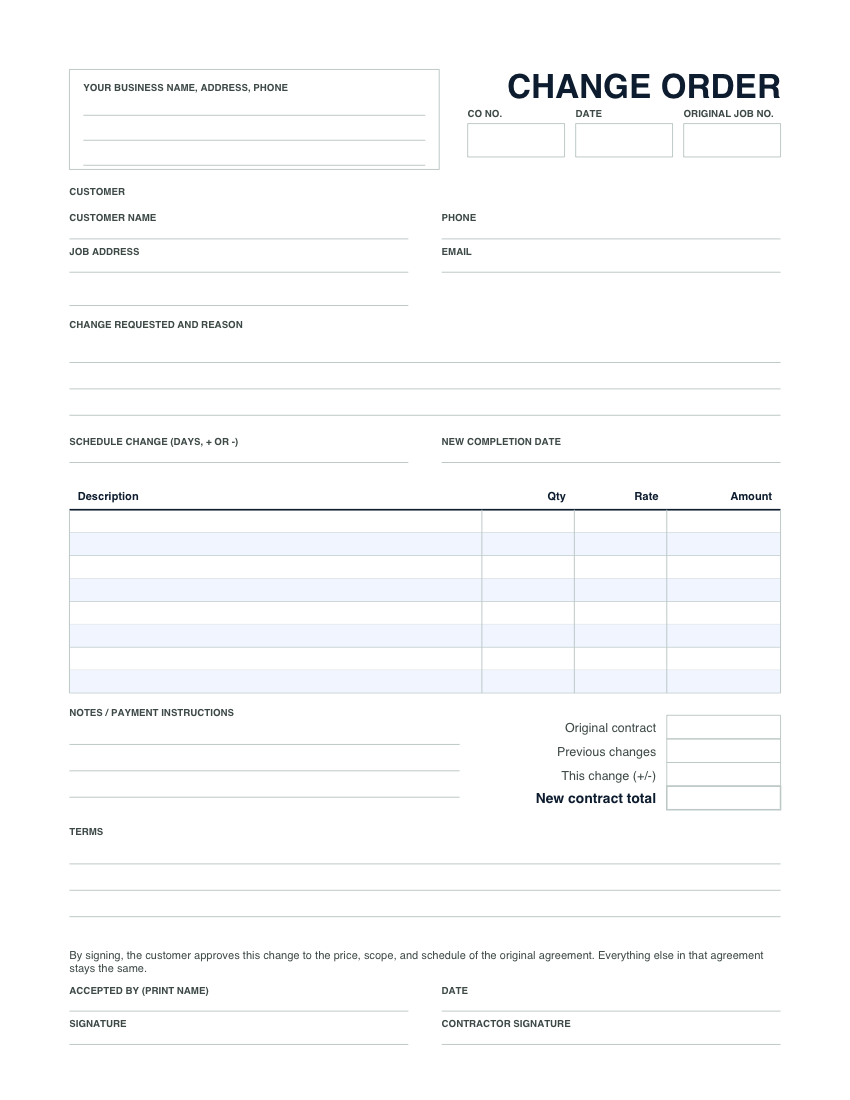
What goes on a change order
A change order is a short, signed update to a job the customer already agreed to. It is not a new contract. It only says what is different. Every box on the form has a job:
- CO number and original job number. Number change orders 1, 2, 3 within each job and write the estimate or proposal number they amend. At invoice time, "CO-2" on a line tells the customer exactly which signed page it came from.
- Change requested and reason. One or two plain sentences. "Rotted subfloor found under the tub after demo. Replace 32 sq ft before tile." The reason is what stops the argument three weeks later.
- Schedule change. If the change adds a day, say so, and write the new completion date. The schedule is part of what the customer is agreeing to.
- Line items. Labor, materials and anything else, priced the same way as the original job. A credit goes on its own line with a minus sign.
- Original contract, previous changes, this change, new contract total. The running total is the part people skip and the part customers care about most. Four numbers, and nobody has to do the math in their head.
- Signatures and date. The customer signs and prints their name. You sign too. Make sure the person signing is the person paying: on a rental or a job for a couple, that is whoever signed the original agreement.
A filled-in example
A bathroom remodel signed at $14,800. Demo opens the floor and the subfloor under the tub is soft. The contractor stops, writes this up on site, and the homeowner signs it before any new plywood goes down.
| Line | Qty | Rate | Amount |
|---|---|---|---|
| Remove rotted subfloor, sister one joist, install new 3/4 in. plywood (carpenter labor, hours) | 6 | $75.00 | $450.00 |
| Plywood, joist lumber and fasteners ($118 cost plus 20% markup) | 1 | $141.60 | $141.60 |
| Haul away rotted material | 1 | $85.00 | $85.00 |
| This change | $676.60 | ||
| Original contract / previous changes | $14,800.00 / $0.00 | ||
| New contract total | $15,476.60 |
Reason line: "Rotted subfloor under tub found during demo. Must be replaced before tile." Schedule change: +1 day. If the homeowner later drops the heated floor mat that was in the original price, change order 2 credits it back as a minus line, and the new contract total goes down by that amount.
How to price a change
Exactly the way you priced the job. Your normal labor rate (US carpenters bill roughly $55 to $95 an hour, general labor $35 to $60), materials at your normal markup (10 to 25% over cost is typical for general contractors), and a line for disposal or a permit revision if the change needs one. Do not discount it because it feels small, and do not inflate it because the customer is already committed to you. Both cost you later, one in margin and the other in reviews. If you need a refresher on your numbers, the labor rate calculator and the markup calculator do the arithmetic.
Get the signature before the work
The order matters. Price it, get the yes, then do the work. Extra work done first and billed afterwards leaves the customer feeling cornered and leaves you with nothing written to point to. A customer can also say no, and that is fine: the form records the decline too, and nobody is surprised by the final invoice. One sentence in every estimate makes this easier: "Hidden conditions found after work begins will be quoted in writing before work continues." Then the change order is just the rule you both already agreed to.
Credits and reversals
Change orders run both ways. When the customer drops part of the job, write a change order with a minus line, so the lower total is on the record as clearly as an increase would be. If a change is reversed later, do not cross out the first form. Write a second change order that takes it back off. Both pages stay in the job file, and the history makes sense to anyone who reads it.
Paper on site, signed online after
Paper is the right tool in a crawlspace with no signal. Back at the truck, the same change can go to the customer as a link. With Numulo change orders the customer sees what they originally agreed to, what is changing and the new total on their phone, types their name to accept, and the balance invoice picks up the change as a CO line on its own. The signed record is permanent. Change orders are included on every plan, the free one too, and work on top of an accepted proposal.
Frequently asked questions
What is a change order?
A written, signed amendment to a job the customer already agreed to. It lists the work being added or removed, the reason, the price of the change, the new contract total and any effect on the schedule. Everything else in the original agreement stays the same.
Do I need a change order for a small extra?
Yes. Small extras agreed out loud are the most common reason a final invoice gets disputed, because nobody wrote anything down. Filling in the form takes a couple of minutes and settles the price before the work, while everyone remembers the conversation.
Is a handwritten change order valid?
A change order signed by both sides is written evidence of what was agreed, whether it is handwritten or signed online. Some states' home improvement rules require changes to a residential contract to be in writing and signed, so check with your state contractor licensing board or your attorney for the rules where you work.
Can I add my logo to the form?
On Pro, yes. The change order pad prints with your logo, business name, address, phone, email and saved terms, from Settings. The free form leaves a labelled box for your details or a rubber stamp. Online change orders are free on every plan.
Related
- Printable forms: blank invoice, estimate and proposal forms in the same layout
- Contractor invoice template: bill the job, change orders included, as a PDF
- Estimate template for the original price
- General contractor proposal template with optional items the customer can tick
- All free invoice templates and tools