Change orders your customer signs on their phone
The job changed. Get it in writing before you do the work, and let the invoice update itself.
Every trade knows the moment. The wall is open and the framing is rotten. The customer wants a second outlet while you are there. They drop the gutter work they ticked last week. You agree a price in the driveway, do the work, and three weeks later the invoice is higher than the proposal they signed and nobody remembers the conversation the same way. A change order is how that stops happening: a short signed amendment that says what is being added or taken off, why, what it costs, and what the job now totals.
 4:30
Play the video: Change Orders for Contractors: Stop Losing Money on "While You're Here"
Change Orders for Contractors: Stop Losing Money on "While You're Here" · 4:30. The video plays from YouTube when you press play.
Chapters and transcript
- 0:00 The most expensive words in contracting
- 0:41 What goes on one
- 1:25 Yes, even for small extras
- 1:59 How to price a change
- 2:30 Changes go both ways
- 2:52 The sentence to put in every estimate
- 3:27 Getting it onto the invoice
- 4:06 Wrap up
The most expensive words in contracting are "while you're here". While you're here, can you add an outlet? While you're here, can you take a look at that faucet? You say sure. You agree a price in the driveway. You do the work. Three weeks later, the invoice is higher than the estimate they signed, and nobody remembers that conversation the same way. Now you're arguing over a hundred and fifty dollars with a customer who was happy an hour ago. The fix takes about a minute. Before you touch the extra work, put it in writing, and get a yes.
That piece of writing is called a change order. It's a short, signed update to a job your customer already agreed to. It isn't a new contract. It just says what's changing.
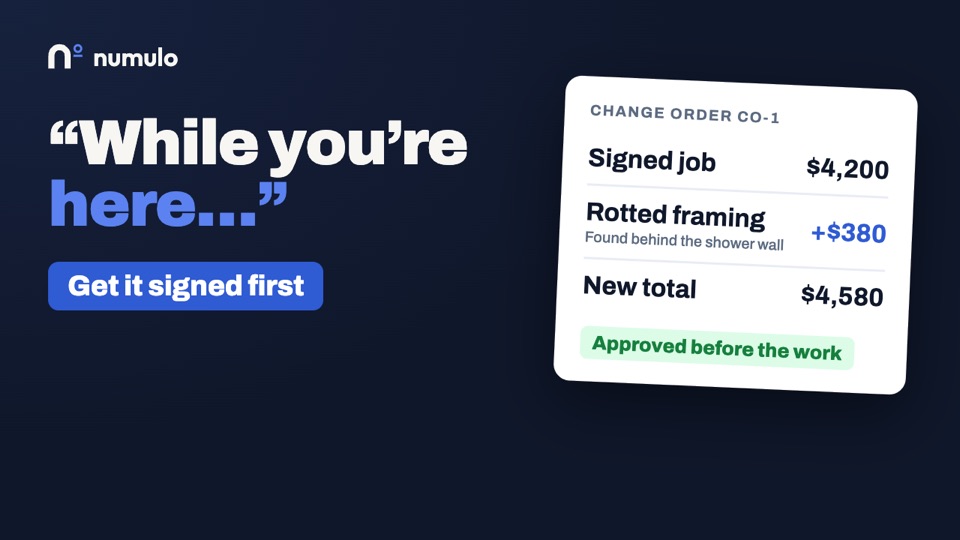
A change order only needs four things. One. What's being added, or what's coming off the job. Two. Why. One line is enough. "Rotten framing found behind the shower wall." Three. What it costs. The price of the change, on its own. And four. The new total for the whole job. That last one matters most. Your customer shouldn't have to add it up. They should see it plainly. The job was $4,200. This change is $380. The new total is $4,580. Then they sign. A typed name on their phone is fine. Now the invoice at the end matches what they agreed to.
Do you really need one for a small extra? Yes. Small extras agreed out loud are the most common reason a final invoice gets disputed, because nobody wrote anything down. It isn't about trust. It's about memory. Yours and theirs.
Your customer can also say no. That's fine. Now you both know the extra isn't happening, and that's written down too.
And the order matters. Price it first. Get the yes. Then do the work. If you do the work first and ask afterwards, your customer feels cornered, and you've got nothing to stand on.
How do you price a change? The same way you priced the job. Your labor rate. Your materials, with your normal markup. Don't discount it because it feels small. And don't inflate it because your customer is already committed to you.
If the change adds time, say so. "This adds half a day." The schedule is part of what they're agreeing to.
And make sure the person approving it is the person paying. On a rental, or a job for a couple, get the yes from whoever signed the original.
Change orders go both ways. Say your customer drops something. The gutter work they wanted last week, for example. Write that up too, as a credit. The total goes down, and it's on the record.
It works the same way if a change gets reversed later. You don't erase the first one. You write a second one that takes it back off. Both stay in the history, and that's the point.
Put this sentence in every estimate you send. "Hidden conditions found after work begins will be quoted in writing before work continues." Because sooner or later, you'll open a wall and find something nobody could see. Rot. Old wiring. A pipe that isn't up to code. Without that sentence, your customer thinks your price covered everything. With it, they've already agreed to how surprises get handled. You stop. You show them, with a photo if you can. You give them a price. They sign off. And you carry on. No argument, because the rule was set before the job started.
Here's the part people skip. Once a change is approved, it has to land on the invoice. And it should be labeled, so your customer can match it to what they signed.
On Numulo, that happens on its own. Your customer opens the link on their phone. They see what they originally agreed to, what's changing, and the new total. They type their name, and accept. The invoice for the balance picks up the change, marked as change order one, and the total updates. You don't retype anything. The deposit they already paid isn't touched.
And each approval is saved with the name, the time, and exactly what was agreed. It can't be edited afterwards. Not by you, and not by us.
So. When the job changes, write down what, why, how much, and the new total. Get a yes before you do the work. And put the hidden conditions sentence in every estimate, so surprises already have a rule.
Change orders are included on every Numulo plan, including the free one. Head on over to numulo.com. Thanks for watching.
How it works
- Open the accepted proposal and add a change order. List the work being added, or tick credit for anything coming off the job, and write one line on why. Tax rate and currency come from the proposal the customer already accepted, so the numbers cannot drift.
- Send the link. Your customer sees what they originally agreed to, what is changing, the price difference, and the new job total, on any phone. No account, no app.
- They type their name and accept. Same as the proposal: a typed signature against a consent sentence. They can also decline, with a reason.
- The invoice updates itself. The unpaid balance invoice gains the change order lines, each marked CO-1, CO-2 and so on, and its total is recalculated. You retype nothing.
A record nobody can rewrite
Each approval is stored the same way a proposal acceptance is: the name typed, the time in UTC, the IP address and browser, the exact content agreed, the totals, the consent wording, and a SHA-256 hash of that content. The database refuses to edit or delete the record, for us as well as for you. If the job is ever disputed, the change order PDF carries the signature line and the hash, and it says what was agreed on the day.
An accepted change order can never be deleted. If the change is reversed, a second change order credits it back, and both stay on the record. That is the point of having one.
What happens to the money
The deposit invoice is never touched, and neither is any payment you have recorded. The change lands on the unpaid balance invoice. If that invoice is already paid, the extra work goes on a new draft invoice tied to the same job. If a credit is larger than what is still owed, nothing is changed automatically and you are told to refund it by hand, because a refund is a decision and not a calculation.
What it costs
Nothing extra. Change orders come with proposals, which are free for three a month and unlimited on Pro at $9 a month, or Team at $15 a month for up to five people. A change order does not count against the three. Your logo and colours on the customer page and the PDF are part of Pro, the same as on proposals.
Frequently asked questions
What is a change order?
A written amendment to a job the customer has already agreed to. It lists the work being added or removed, the reason, the price difference, and the new total, and the customer signs it before the work is done.
Do I need a change order for a small extra?
It takes about a minute and it removes the argument at invoice time. Small extras agreed out loud are the most common reason a final invoice gets disputed, because neither side wrote anything down.
Can a change order reduce the price?
Yes. Mark a line as a credit and it comes off the job total. The balance invoice goes down by exactly that amount, tax included.
What if the invoice has already been paid?
The paid invoice and its payments are left alone. Added work goes on a new draft invoice linked to the same job. A credit on a paid job is flagged for you to refund by hand.
Is a typed name a valid signature?
In the United States the ESIGN Act and state UETA laws give electronic signatures the same standing as ink for most commercial agreements. Numulo records the typed name with the time, IP address, browser, the content agreed and a hash of it. This is general information, not legal advice; ask a lawyer about contracts in your state.
Does my customer need an account?
No. They open a link, read the change, type their name and accept. It works on any phone.
Related
Free printable change order template · Proposals · E-signature · Estimates · Getting paid · Warranty tracking · Pricing